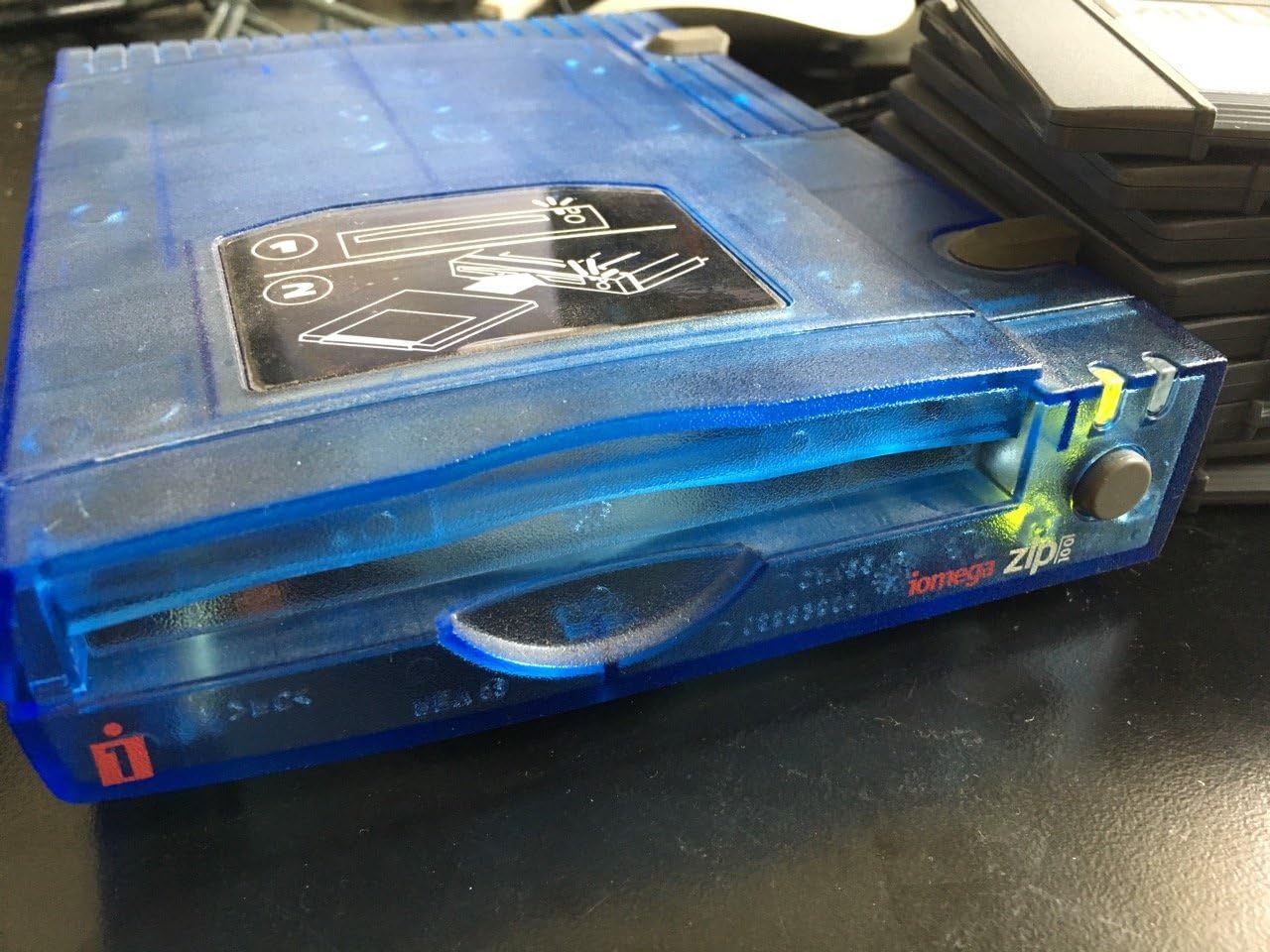
This translucent-blue square-edged old-style Iomega Zip 100 drive is quiet - it does *not* make irritating racket like some of the other, more recent, rounded-edge Iomega Zip drives. This translucent/clear-blue Iomega drive just makes a polite barely-audible tiny little whirring noise when it's accessing files, and it makes the standard 1999-era non-objectionable mild "thunk" when you eject a disk. So if you've ever owned one of the original Iomega Zip drives from back in the late 1990s, that's the same kind of nice sound that this one makes. Also, when you eject a disk from this drive, the disk doesn't go flying out of the drive like on some of the newer models - it only ejects far enough for you to reach it. Perfect. This Zip drive's case is sturdy and solid, seems well-built, not flimsy like some newer models. The quietness quality is exactly why I bought this Zip drive - to replace newer noisy ones that were waking up my neighbors (seriously). I've owned two of the noisy newer ones, and I'd had quite enough of them, so I am very happy to finally get ahold of another old-style traditional quiet Zip drive. (One of my noisy flimsy newer ones got accidently dropped onto a concrete floor and stopped working, and the other noisy newer one I will keep for a spare for future years' use, just in case.) At least in my case, the Zip drive being reviewed here, works perfectly in both Microsoft Windows XP Pro and Ubuntu 10.10 (Linux). No bugs, no glitches, just good solid performance. The PC that I have this Zip drive hooked up to, dual-boots to both Ubuntu and XP Pro, and the Zip drive works fine with both of those OS's. I use Zip drives for occasional file transfers between a fairly-modern low-end PC (for internet and coding) and an antique Mac (which is used for image editing). The ancient Mac has no USB capability, but it has its own separate SCSI Zip drive built-in, which makes it easy to use the exact same Zip *disks* on both the PC and the Mac (the Mac reads/writes to PC-formatted disks). Due to the huge difference in ages of the operating-systems I run, for me to try to do something fancy like "network" the machines would be beyond my meager technical abilities (or lack of), and the old Mac isn't suitable for online/internet use anymore, so I depend on Zip disks for an occasional (once a week or so) small file transfer between machines. I will probably still be using Zip disks for years to come, given the financial investments I have in legacy high-end software (which only runs on the old hardware). Zip disks keep me from having to spend $10,000.00 on an entirely new equivalent system+software+peripherals, and the old stuff still works just like new. Under Windows XP, for the Zip drive being reviewed here, you can optionally install the Iomega software (comes on a CD included with the Zip drive, or at least it does if you're buying one of the new factory-sealed drives - however, used/second-hand models might or might not have the CD but you can probably download the software from Iomega or someplace) or you can ignore the Iomega software - Windows XP can use the Zip drive without any extra drivers (the drivers are apparently already built into Windows somehow). Although if you want to do stuff like long format+verify of your Zip disks (good to do once a year or so, as preventative maintenance), you would have to install the Iomega software to do that, because Windows doesn't do the normal *thorough* Iomega 8-minute format+verify on Zip disks. But it does everything else just fine. Under Ubuntu 10.10, this Zip drive is also recognized and fully functional, without having to install any drivers or software, and no need for any command-line wizardry either. I haven't tried hot-swapping the Zip drive; I plugged in this Zip drive first, then booted (started) the computer, and the Zip drive is instantly recognized and ready for use. However, I don't know if there's any way to do the 8-minute long-format-and-verify of Zip disks in Ubuntu. My Zip disks are PC-formatted, but Ubuntu reads/writes to them just fine. NOTE: Seems that if your Zip disks are *Mac* formatted, Ubuntu 10.10 has permissions problems and mounts the disks as read-only - it can read the files but not modify/add/delete files - there might be some workaround for that but I'm not technically knowledgable enough (nor sufficiently motivated) to figure that out. Anyway, Ubuntu works fine with *PC-formatted* Zip disks, and since the old Mac also can read/write PC-formatted Zip disks (via, in my case, the Apple "PC Exchange" control panel (see footnote below) in Mac OS 8.1, and the Mac's own *separate* SCSI Zip drive), the Zip *disks* serve as a nice simple fuss-free way to transfer files to/from a USB-equipped modern PC and a non-USB antique Mac. If you're trying to set up something like this, don't forget that you'll need *two* Zip *drives* - a USB Zip drive (like the one I'm reviewing here on this page) for the modern computer, *and* a separate non-USB Zip drive (most likely SCSI for antique Macs, I-dunno-what for antique PCs) for the antique computer. This Zip drive being reviewed here, was manufactured during the era where I assume it is probably USB 1 or one-point-something, but it works just fine with my USB 2.x PC - USB is pretty excellent with handling "backward-compatibility" things like that. The write speed should theoretically be slower but I haven't really noticed any difference. Let's face it, these Zip disks only hold 100 MB anyway, actually more like 95 MB or so after formatting, so it's not like you're going to be putting gigantic files on 'em anyway. So the difference in speed, between USB 1 and USB 2, isn't really a noticeable issue with Zip drives. One other note: I have been a regular user of Zip drives and Zip disks since the late 1990s and, for some reason I have never experienced (knock on wood) the infamous Iomega "click of death" that some people have experienced. I don't know why. Maybe because I long-format my Zip disks at least once a year just as prevention, or maybe because they aren't in a dusty or hot environment, or maybe because they're only used between two Zip drives and not bounced around between dozens of 'em, or maybe because they only get ejected/inserted a few times a week at the most (thus not wearing out the mechanism), or maybe just luck. Although I wouldn't recommend using any single media-type as your only backup (redundancy is always good, for backups, just in case one method fails), but for my uses, Zip disks have been, are still are, a reasonably-reliable and definitely-easy file-transfer method. Of course, if *all* your computers have USB, just use USB thumb-drives instead of Zip drives. :) Oh, one other thing, in case other people haven't already mentioned this (I haven't yet read *all* the other reviews here, will do that later) - this particular Zip drive has (or at least, is *supposed* to have) its own separate power-supply that you plug into a regular A/C outlet, so the drive has its own power, rather than being USB-powered. This is probably a good thing because if you already have tons of stuff plugged into your USB ports (using multiple low-cost non-powered USB hubs), this way you don't have to worry about putting too much electrical drain on your USB ports. No need for a "powered usb hub" or anything. I happen to be running this particular USB Zip drive off of a USB hub that has other things plugged into it too, although I read someplace once that sometimes you have to plug certain things directly into a port on the computer, instead of using a hub... works good either way for me, though. ____ * FOOTNOTE: With regards to the Apple "PC Exchange" control panel on antique Macs, in my case there was a conflict between it and (ironically) the Mac version of Microsoft Internet Explorer 5 web-browser. The workaround, since the old Mac isn't used for internet/online stuff anymore anyway, was just to disable most of the IE-related extensions in the System Folder, and that solved the problem. Now the old Mac can read/write PC-formatted disks again, including Zip disks - on its own separate SCSI Zip drive, not the one being reviewed here, but Zip *disks* can be transferred to any Zip drive on any computer, including the Zip drive being reviewed here. This is relevant to this review because of the legacy aspects of all this equipment, including Zip disks and their usefulness for transferring files between old and new computers of different types. :) ------ ** EDITED to reflect the fact that the Zip drive I'm reviewing here, was new factory-sealed in the original box (pretty amazing considering that I purchased it in April 2011), had not been previously used, and all the parts were there that were supposed to be there. I don't know if that matters *except* when it comes to things that (in my case) were included with this particular Zip drive, such as the power supply (REQUIRED) and the CD (optional). Trying to future-proof :) this review, if you choose to buy one of the various used/second-hand models instead of one of the new-in-original-box models (depending on what's available), you might or might not get those other items such as power-supply and CD - ask whichever seller you're buying from, if it isn't already specified on the Amazon page... these things tend to change fairly quickly.