Buy anything from 5,000+ international stores. One checkout price. No surprise fees. Join 2M+ shoppers on Desertcart.
Desertcart purchases this item on your behalf and handles shipping, customs, and support to Taiwan.
๐ผ Elevate your data game with the ultimate 4-bay storage enclosureโbecause your files deserve the best!
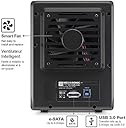
The Mediasonic PROBOX 4 Bay DAS enclosure supports up to four 3.5" SATA drives with a combined capacity of 120TB, featuring SATA III 6Gbps transfer speeds. It offers dual USB 3.0 and eSATA connectivity with a one-button interface switch, built-in temperature sensors, and smart fan control for optimal cooling. Compatible with Windows 10/11 and Mac OSX, this metal-constructed enclosure is designed for professional-grade storage expansion and reliable high-volume data management.


| ASIN | B09WPPJHSS |
| Best Sellers Rank | #86 in Enclosures |
| Brand | Mediasonic |
| Built-In Media | Main Unit + Accessory |
| Color | Black |
| Compatible Devices | Desktop, Laptop |
| Connectivity Technology | SATA |
| Customer Reviews | 4.0 out of 5 stars 356 Reviews |
| Data Transfer Rate | 6 Gigabits Per Second |
| Enclosure Material | Metal |
| Hard Disk Form Factor | 3.5 Inches |
| Hardware Interface | USB 3.0, eSATA |
| Hardware Platform | Windows, Mac |
| Item Dimensions L x W x H | 6.8"L x 4.9"W x 9"H |
| Item Weight | 4 Pounds |
| Manufacturer | Mediasonic |
| Material | Metal |
| Memory Storage Capacity | 72 TB |
| Mfr Part Number | HF2-SU3S3 |
| Model Number | HF2-SU3S3 |
| Product Dimensions | 6.8"L x 4.9"W x 9"H |
| Supported Devices Quantity | 4 |
| UPC | 629329002368 |
| Warranty Description | 1 Year Warranty from Mediasonic Store |
T**M
Quick, easy, and effective
Replaced an old Proliant Micro server (NxxL 1st gen) that would keep losing cheap Flex ATX power supplies every year or two. Was looking for a replacement that also had 4 bays, low power consumption and no need for RAID to drive a headless Linux media NAS with several Docker apps installed. Paired it with an older EliteDesk USFF which was already doing other related duties. Fit and finish is fantastic, better than expected. It's still slightly on the cheesy side and the lights are excessively bright (I'd recommend some black tinting tape). Drive installation was very easy. Much smaller than I expected. Options are dead simple and you basically know how to operate it from the small labelled picture on the folded quick start guide. Fans are quiet, even on max, although I'm not yet sure how well they are cooling the drives. Auto-sleep function also works well (I wouldn't use the auto-off as it fully powers down and doesn't power back up). I have been using it in USB mode since I am using a tiny, slim desktop with no expansion options and it has worked well so far. Drives were detected right away. I have not yet gained S.M.A.R.T. visibility but hope to at least get a basic "healthy" status. It's not technically supported (Linux that is) so not something I'd ding it for since I can read :-) Really nice unit so far. If all goes well, may pickup the 8-bay version for my backups. MAY 2025 UPDATE - Still running strong, no new fan noise/vibration, good disk health, never once had to reset due to disk communication loss. Have had power loss in my home where I had to manually turn the enclosure back on, but basically non-issue. Maybe people have problems with the USB 3.2 version and/or RAID? Was happy to see Mediasonic back in stock so immediately ordered the 8-bay eSATA/USB 3.0 when it became available. Both connection options exceed the network connectivity to the attached PC so no need for 3.2
A**E
Bright Lights, Good Value,
I add my voice to the small group who think that a drive activity indicator does not need to be bright enough to read the fine print in a EULA. There is a six-inch piece of black electrical tape in the future of my ProBox. The unit came with a map-fold sheet labeled 'Quick Installation Guide' on the front, and a 'Thank You' note. Both had different web links that offered a manual. I could not make either of these links work. When I came to write this review I discovered a bullet in the 'About This Item' section that offered a link to a manual. After scrolling up and down the page for a while I found the link rendered in the smallest type, just where the bullet said it would be. This link worked for me and led to a PDF version of the same map-fold sheet that came with the unit. In spite of what it says on the front, that sheet apparently is the manual. As such it offers pretty good graphics with mediocre and obviously translated accompanying text. The most glaring fault is the total absence of technical specifications. It does have enough information to get the unit set up and running. One of the things you may need the manual for is how to get the unit open. It features a unique set of molded plastic latches, one for the hinged front panel (which comes off when you open it) and a different style set-of-two to remove the plate that holds the drives in their bays. These appear fairly sturdy but I wonder about their longevity in the warm environment. Fortunately they don't appear to be necessary for the operation of the unit. As a person with experience using external drive enclosures I found the setup reasonably easy. The unit and all drives were immediately recognized by my eSATA I/O card and have run seamlessly for about a week. I am not a fan of power bricks and this one looks particularly vexing because it uses a right-angle connector to plug into the side of the unit at the back. This means you can't put that side up against anything or have two units side-by-side without a gap. I read some comments about overheating. I have not experienced this. I loaded the ProBox with four 7200RPM terabyte-sized drives and set it to a multi-hour backup task. I never saw temperatures in excess of 41ยฐC. It didn't even ramp up the automatic fans. In any case there is a manual fan control that can turn them up to a dull roar. I used eSATA to hook the ProBox to my MacPro and discovered I had to disable the automatic shut-off feature because it would not wake when the computer came out of sleep mode. This might work better with a newer computer or over USB. This isn't a big power-waster because the computer system spins down the drives in sleep mode. I found the operation of some of the front panel push buttons less than intuitive. To change the interface mode you must hold the button for several seconds. To power the unit on you push and release the power button. To power it off you must push and hold the power button. Bottom Line: In spite of some quirky design choices, overall this appears to be a reasonably well constructed unit at an attractive price. I liked the first one well enough I ordered another.
F**T
Exactly what I wanted!
This mediasonic probox 4 bay enclosure is exactly what I needed! I have two 14TB Seagate exos X16 enterprise HDDs in it hooked up to my PC using eSATA VIA a 10Gtek eSATA to PCie card (also purchased here on Amazon) and it works great! I did install and update the 10Gtek driver before I hooked the mediasonic enclosure to my computer. The drivers for the 10Gtek card is no where to be found if you search for 10Gtek drives BUT this card is based on the ASMedia ASM1061 chip so I went to ASMedias websites and found the driver there. Once that driver was installed, I hooked the mediasonic probox enclosure up and turned it on and windows 11 recognized both my drives with no issues! For me, It was easy to open and install the drives. Yes, as mentioned by others here, the front blue lights are bright when its on but it doesn't bother me because I have it under my desk where its not really visible and plus I don't leave it on all the time. I only turn it on when I have to make a backup of something. I have the fan on high because fan noise doesn't bother me, plus all I'll about keeping components as cool as possible. On high, yes it is very noticeable but on medium, it is barely audible to me from about 3 feet away where it sits. And speaking cooling, it does a good job of keeping my drives cool. At Idle, according to crystaldiskinfo, they sit at about 34c-36c. I copied 4 TB of data to both drives and even copying for 10+ hours straight, neither drive got above 45C. I should mention I copied data to one drive at a time and not simultaneously so I can't speak to how the the temps would be doing more then one at time. Copy time was as I expected for 7200RPM drives in the range of 60MB/s to 220MB/s with an average of about 80MBs-110MB/s. I had a lot of very small files in the transfer so speeds where up and down. I am also using a 6FT eSATA cable and no issues with that length. I have not used USB nor do I plan on it so I can't speak to how that performs but I'm sure its good. I had read that eSATA can be a little more reliable and stable when transferring large amounts of data at a time so since I had planned on moving 4+ TB at a time, I specially went with eSATA. So far, I'm more then pleased with purchasing the mediasonic probox enclosure and will definitely purchase another one if I ever need another in the future!
A**R
Would not recognize any hard drives I tried
I spent hours trying to get various HDDs to work with this enclosure. I tried three different Western Digital Red Nas drives, three Seagate Ironwolf drives, and a few other random old HDDs I had lying around. The enclosure itself would not recognize the drives, the drives would not spin up, the indicator lights showing a HDD connection would not light up. I thought it was a 3V pin issue, no. I thought I received a faulty unit so I ordered a second one and still had the same issues. I ended up getting frustrated and bought a Terramaster enclosure and within 10 minutes my drives were recognized and connected to my computer.
D**E
Dead Drobo 5N. MediaSonic Probox is the DAS fix!
Got a dead Drobo? With now nonstandard formatted drives? I had 2 of mediasonics RAID boxes. Great products. I bought this box to create a JBOD using those old DROBO drives. Outstanding! 20+TB of backup DAS storage...
T**M
Test your drives, have patience
Works wonderfully after some minor hiccups. The device itself is sturdy with fan and standby options. Its fairy small holding 4 HDD, and the indicator lights are quite bright. Important notes: * If one drive is bad, none of them will show. This was my first issue, quickly solved by checking each disk in Slot 1 one by one, ejecting from PC and powering down between each check. This may take time, but save you from a headache and data loss later. * Also the included USB cable is quite short, at about 2-3 feet or so. I suggest getting a USB female to male extension cable, or your device will have to be quite close to the USB connection port.
A**S
Good, as long as the front door is open or taken off
Edit: another reviewer, who posted after I did, states that this "does not support drive sizes above 8 (eight) TB". This is incorrect. I have four 12TB drives in mine, no issues. I use this unit to contain some back-up drives that I periodically sync to. As another knowledgeable user reported, ventilation is poor while the front door is closed. Therefore, I knew this before I bought it and I was monitoring my hard drive temperatures with an app (CrystalDiskInfo) & noticed they went into the red (over heating, potentially damaging the drive/s) while I was syncing with the front door was closed. I should have just removed the front door before using it, but I had to test it and know for myself. Luckily, the front door can be left open, and is easily detached (in fact, it'll probably fall right off if you slightly bump/touch the unit or door while it's open, so you may as well just remove it while in use) and the temps dropped back down into a normal operating range. The same app that monitors my drive temps also indicates that their health is still good, so no permanent damage most likely. Otherwise, installing the drives and setting everything up in Windows was very easy and straight forward. In general, this unit works very well for its intended purpose, and transfer speeds are good, but the over-heating issue is rather important (considering the value I put on my personal data). I'd rather not have to remove parts to make something work properly, and then reinstall them when I'm finished (to keep dust out).
S**L
Works with 18tb WD Ultra Stars, temperatures, and some mods
I have gone thru 5 other brand's 18+ tb rated enclosures and they either wouldn't mount or refused to allow read/write to my DC HC655 drives. I didn't want this enclosure due to the soft power button and therefore inability to be controlled by a Kasa plug for remote desktop use, but it turns out this is the enclosure I need because it works and I'm tired of experimenting. I was running it door off fan high restrictive fan grille deleted and maintaining 36ยฐc under load with the room at 72ยฐf. With the grille fan high was 39ยฐ, with the grille and door closed fan high it hit 43ยฐ but I didn't like that and opened it before the drives got hotter; it would likely end up higher as it hadn't been on for long. The drive lights got green masking tape covered in black marker to prevent eyeball damage as they're ridiculously bright. Swapped the short AC cord for a 6 foot one so the brick can sit on the desk and not be hanging from the plug as the DC cord is also too short to reach from floor to desk. Upgraded it with a Noctua pwm (stronger than 3 pin) fan but reverted back to the original noisy one as it moves more air and keeps things several degrees cooler than the brown fan. Now running an Arctic P8 Max fan, quieter and stronger than stock, 34ยฐc under load fan high no door no grille. You'll need a micro ph-2mm 2 pin to 3/4 pin adapter and m2.5x35mm screws to stick a nice 80x25mm fan on this thing. The stock fan is 80x20mm and the 27mm screws are barely long enough for it. Enclosure bottlenecks and achieves only ~390 mb/s (3.12 gbps) when all four drives are accessed simultaneously with each drive just shy of 100 mb/s. The 5 gbps rating is rubbish as two drive access also hovers around 390 mb/s though my drives are capable of 220 mb/s each. Computer is a 13900hx powered Legion in performance mode so it's plenty fast for the task and the speed fault lies with the enclosure.
R**D
Works well
I highly recommend this enclosure
I**L
I've had 4 Mediasonic 4-bay boxes for over 10 years, and only had to replace one.
I got my original boxes that were USB 2.0 and eSATA and have used them non-stop for over 10 years... they are simple to use but required a esata card with port multiplier to use, which made them a bit complicated to set up. The only situation I had for all those years was a power supply for one that died and had to be replaced. When COVID hit, one of the boxes died and I replaced it with a newer esata/USB 3.0 model but it was used as all new stock were impossible to find. And 2 years later, that is the box that has now died on me, but it is possible that it's due to power surges and such as these last few months, the city has had a lot of problems due to many storms and such, and it may have also damaged my UPS that should have prevented damage to my devices including these boxes... I'll never know. But that said, this box is replacing that other one (and is the exact same) and I will hope that it will last as long as my other older boxes that are still going strong so far. These boxes are simple to use, with only one annoyance of needing a small handle to be installed on the drives. The fans are very silent and aside the situation that requires me to get a replacement, have been very solid and working very well for a lot of year. In time I will most probably need to replace them for a more modern setup as the old boxes are supposedly limited to 4TB drives (while the newer ones are able to use much larger drives) and will switch to USB 3.0 (or better) and leave the eSATA in the past so to prevent the headaches I've had due to that. I almost went with the 8-bay boxes, but reviews have been alarming in reference to the number of issues that people have had compared to the 4-bay ones, so I'll have to see when the time comes. But for now, these boxes have been great, have been through constant use (24/7) and I've enjoyed them greatly, and for a price range that left all competition far behind.
S**N
Economic and sleek SATA Caddy
Bought this to house 4x SATA drives from a broken PC. Really easy to assemble and place the drives, and no problems accessing them once seated. Intructions are fairly idiot-proof as well.
H**I
Just a Bunch of Disk box.
Works well as a JBOD, good data transfer speed. Front cover is held down by a flimsy plastic catch the broke on the second opening.
A**N
Great add-on to have
OK, Like many of you, I had a few HDD lying around collecting dust, and I'm not talking about cheap stuff either. They were 2TB + that I pulled from my workstation when I scaled down to a laptop. The laptop does have a 2TB SSD, but I guessed might as well have more room then not enough (and I'm tired of "renting" space on the cloud) . This enclosure allowed me to have multiple HDD, each with a specific tasks, especially one for my backup and another for my backup's backup (I know, I know, but those who lost years of work because of poor or non-existent backups will understand) Been running great and everything secured...And yes, the Backup's Backup is safe in a theft/fire resistant safe....
Trustpilot
2 weeks ago
2 weeks ago